As businesses grow, it becomes increasingly complex to manage employees, operations, inventory, finance, and customer relationships. Many organizations buy business software to make their lives easier, but which is the right one?
The two most frequently evaluated systems are Workforce Management (WFM) Software and Enterprise Resource Planning (ERP) Software.
Most entrepreneurs think that these solutions offer the same set of functionalities but they solve different business problems. The wrong purchase will quickly turn into wasted capital, feature inflexibility, and a poor ROI.
This is the guide to understand differences between Workforce Management Software vs ERP software and decide which possible solution will help your business needs.
Understanding the Challenge
These are the Problems a lot of Indians Companies Follow:
- Attendance and payroll errors
- Difficulty managing employee shifts
- Poor workforce visibility
- Inventory inaccuracies
- Delayed approvals
- Disconnected departments
- Multiple software systems that don’t communicate
- Slow decision-making
The key question is:
Are these workforce problems/potential business process problems or hybrids of both?
This answer will decide whether you should opt for Workforce Management Software, ERP software, or an integrated solution.
What Is Workforce Management Software?
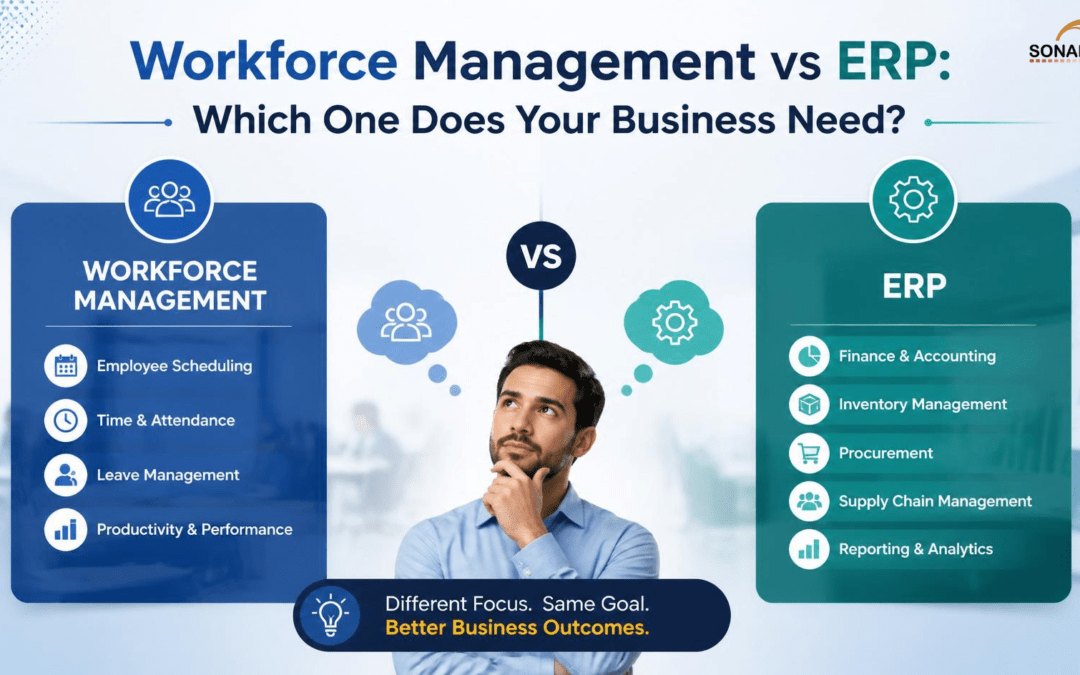
Workforce Management Software (WFM) is a software that enables companies to facilitate and manage their workforces as well as management issues.
At its core, it primarily aims to improve employee productivity, ease scheduling issues while minimizing administrative work, and ensuring consistent attendance and payroll data.
Core Functions
- Attendance tracking
- Shift scheduling
- Leave management
- Overtime monitoring
- Employee time tracking
- Workforce planning
- Mobile attendance
- GPS tracking
- Employee self-service
- Workforce analytics
- Payroll integration
Best For
- Manufacturing companies
- Warehouses
- Logistics businesses
- Retail chains
- Healthcare organizations
- Hospitality businesses
- Construction companies
- Service-based organizations
What Is ERP Software?
Enterprise Resource Planning software (ERP) consolidates many corporate processes into a single unified system.
ERP manages the entired business operation as opposed to just a focus on employees.
Core Functions
- Finance
- Accounting
- Inventory
- Procurement
- Sales
- CRM
- HR
- Production
- Supply chain
- Asset management
- Vendor management
- Reporting
ERP becomes a single source of truth for your business.
Main Differences Between Workforce Management and ERP
| Feature | Workforce Management Software | ERP Software |
| Primary Focus | Employee management | Entire business operations |
| Attendance Management | ✔ | Limited or module-based |
| Shift Scheduling | ✔ | Basic in many ERP systems |
| Leave Management | ✔ | Available through HR modules |
| Payroll Integration | ✔ | Usually integrated |
| Inventory Management | Limited | ✔ |
| Financial Management | No | ✔ |
| Procurement | No | ✔ |
| CRM | No | ✔ |
| Manufacturing Planning | No | ✔ |
| Workforce Analytics | Advanced | Basic to Moderate |
| Resource Scheduling | Advanced | Limited |
| Mobile Attendance | ✔ | Depends on ERP |
| GPS Tracking | ✔ | Usually unavailable |
| Business Reporting | Workforce-focused | Enterprise-wide |
Pain Point 1: You’re Struggling with Attendance and Shift Management
The Challenge
Your HR spends a lot of time not only correcting attendance but also entering absences and (especially) preparing rosters.
Inaccurate data in the Employee module frequently leads to lagged payrolls.
What You Need
Workforce Management: If your greatest operational needs are centered around employee attendance, scheduling, and workforce productivity issues, Workforce Management Software is most likely ideal.
Pain Point 2: Departments Are Working in Silos
The Challenge
- Finance uses one software solution.
- Inventory is managed separately.
- Sales tracks customers in spreadsheets.
- HR uses another platform.
This creates duplicate work, inconsistent data, and reporting challenges.
What You Need
If your business is looking for a full-fledged solution to bridge the gap between finance, inventory, procurement, sales, and operations business processes, then ERP should be the right fit.
Pain Point 3: Managing a Growing Warehouse
The Challenge
Warehouse managers need to:
- Track employee shifts
- Monitor inventory
- Manage barcode scanning
- Generate purchase orders
- Coordinate deliveries
These requirements are not handled by any minimum viable standalone workforce tool.
What You Need
The ideal solution is ERP with warehouse management features along with Workforce Management Software for employees functioning.
Pain Point 4: Payroll Errors Are Increasing
The Challenge
The payroll computation relies on inputs related to attendance, overtime, leave and shift data.
Manual Updates Most often end in salary disputes | High HR Overhead.
What You Need
A Workforce Management system automates attendance tracking and integrates directly with payroll for higher accuracy and less human effort.
Pain Point 5: Outdated Data Leads to Business Decisions
The Challenge
This leads managers to answer questions like:
- Which department has the highest productivity?
- What is today’s production output?
- How many employees are working?
- Which inventory items are running low?
- What are current sales figures?
Decisions are delayed without centralized reporting.
What You Need
While ERP systems give you visibility at the enterprise level, Workforce Management Software helps you gain in-depth visibility into your workforce. These two combined give us a full view of operations.
Workforce Management Software: When Do You Need This?
If your business primarily requires it, then Workforce Management Software is the right choice:
- Automate attendance tracking
- Manage employee shifts
- Monitor overtime
- Improve workforce productivity
- Track field employees
- Reduce payroll errors
- Simplify leave management
- Enhance workforce visibility
This is particularly useful for businesses that work in shifts or have a high volume of frontline employees.
When to go with ERP software?
If your organization requires the following, then ERP software is a better option than HRMS:
- Manage finance and accounting
- Track inventory
- Handle procurement
- Integrate sales and CRM
- Manage production
- Streamline supply chain operations
- Generate enterprise-wide reports
- Centralize business data
Why use ERP: Ideal for businesses seeking end-to-end operational control
Do You Need Both?
In many cases, yes.
For example, expanding companies typically create a fully integrated operational ecosystem by combining ERP software with Workforce Management Software.
For example:
- Workforce Management involves attendance, shift management, leaves, and productivity of employees.
- ERP keeps track of inventory, finance, procurement, production, and customer relationship management.
When used together, employee attendance can feed new inputs to an ERP system for automatic payroll updates (as well as production planning and project costing), which reduces manual effort and enhances accuracy.
Advantages of Workforce Management Integration with ERP
The integration of both solutions offers several benefits for businesses:
- Accurate payroll processing
- Better workforce planning
- Real-time business reporting
- Reduced manual data entry
- Improved inventory planning
- Enhanced operational visibility
- Better compliance
- Increased productivity
- Faster decision-making
- Scalable business operations
This combined method reduces duplication of effort and ensures all departments work using the same current business-critical data.
How to Choose the Right Solution
Before investing, ask these questions:
Choose Workforce Management Software if:
- The challenge is in managing your employees.
- You need advanced attendance & shift management.
- Payroll accuracy is a priority.
- You have mobile or field workers.
- HR processes are mostly manual.
Choose ERP Software if:
- You have to involve multiple departments.
- Thus, inventory and finance management become very important.
- You want centralized business data.
- You require end-to-end operational visibility.
- Business processes are disconnected.
Consider Both if:
- Your organization is expanding rapidly.
- You have multiple branches or locations.
- You want complete operational visibility.
- You should have both workforce optimization as well as enterprise process automation on your plate.
Conclusion
Workforce Management Software and ERP software are not rival technologies; they solve two different problem statements for an organization.
Workforce Management will most affect you if your main problems are with employee attendance, scheduling, payroll accuracy and workforce productivity.
If you want to bring finance, inventory, procurement, sales and operations under a single umbrella then ERP software would be the right investment.
In this case, the best route for a large number of scaling organizations in India is to consolidate Workforce Management Software with an ERP system. Together they help organizations streamline operations, improve employee productivity, work smarter rather than harder, and make faster data-driven decisions.
If you know what your immediate roadblocks are, as well as where you see your growth trajectory heading in the future, it allows you to invest in the solution that will return maximum ROI over time.
Frequently Asked Questions
1. What is the difference between Workforce Management Software and ERP?
Workforce Management Software focuses on employee-related processes such as attendance, shift scheduling, leave, and productivity. ERP software manages broader business functions including finance, inventory, procurement, sales, and operations.
2. Can Workforce Management Software integrate with ERP?
Yes. Many modern Workforce Management solutions integrate with ERP systems, allowing attendance, leave, overtime, and payroll data to sync automatically.
3. Which software is better for manufacturing companies?
Manufacturing businesses often benefit from both. ERP manages production, inventory, and procurement, while Workforce Management Software optimizes employee scheduling, attendance, and productivity.
4. Is Workforce Management Software suitable for small businesses?
Yes. Small and medium-sized businesses can use Workforce Management Software to automate HR processes, improve payroll accuracy, and increase workforce efficiency.
5. Can ERP replace Workforce Management Software?
Some ERP platforms include basic HR features, but they may not offer advanced capabilities such as shift optimization, GPS attendance, geofencing, workforce analytics, and detailed productivity tracking. Businesses with complex workforce requirements often achieve better results by integrating a dedicated Workforce Management solution with their ERP system.